
In this article
Snow Rider 3D Unblocked is a popular search term for the free browser-based sledding game where players race down snowy mountains, avoid obstacles, collect gifts, and try to achieve higher scores. The game can be played online without downloading software or creating an account.
You can play Snow Rider 3D through its developer’s official website, CrazyGames, or Y8. However, access depends on your internet connection and any restrictions imposed by your school or workplace network.
This guide explains where to play, how the controls work, how to unlock sleds, and which techniques can help you survive longer.
What Is Snow Rider 3D?
Snow Rider 3D is a three-dimensional arcade sledding game developed by Ashima Prabhakar, the creator behind gamebiz. It first appeared online in December 2020.
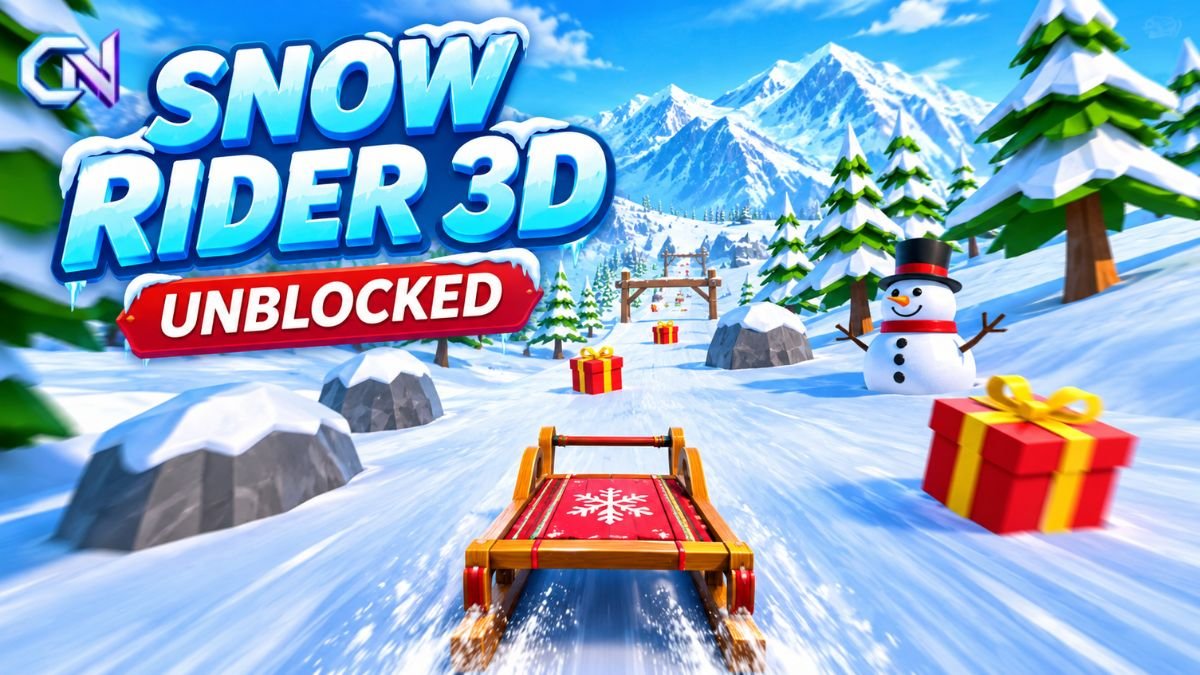
The game places players on a sled travelling downhill through a snowy landscape filled with trees, rocks, snowmen, and other obstacles.
Unlike traditional racing games with fixed courses and finishing lines, Snow Rider 3D uses an endless downhill format.
The objective is to travel as far as possible without crashing.
Players steer through narrow gaps, jump over hazards, and collect gift boxes while attempting to increase their scores. Colliding with an obstacle normally ends the run.
Gift boxes also contribute to progression by allowing players to unlock additional sled designs.
What Does Snow Rider 3D Unblocked Mean?
The term unblocked typically describes a browser game that can be accessed on a network where gaming websites may otherwise be restricted.
Schools, colleges, and workplaces sometimes use filtering systems to limit access to entertainment websites.
As a result, players searching for Snow Rider 3D Unblocked are often looking for a version they can open directly in a browser.
However, the term does not identify a separate official edition of the game.
A website describing itself as unblocked is not guaranteed to work on every school or workplace network.
If a gaming platform is restricted, players should follow their organisation’s internet-use policies rather than attempt to bypass network controls.
Where Can You Play Snow Rider 3D Online?
Several established platforms offer browser access to Snow Rider 3D.
1. Gamebiz – Official Developer Website
The official developer’s website provides a browser-based version of the game.
Gamebiz identifies Ashima Prabhakar as the game’s creator and publisher.
The platform offers free gameplay without requiring an account or installation. It also provides a Nostalgia edition for players who prefer the earlier gameplay experience.
The developer’s version receives updates and includes additional sleds, achievements, and other gameplay features.
2. CrazyGames – Free Browser Version
CrazyGames is another established platform where Snow Rider 3D is available.
Play Snow Rider 3D on CrazyGames
Its listing credits gamebiz as the developer and supports desktop, mobile, and tablet browsers.
CrazyGames also provides information about the game’s controls, scoring system, unlockable sleds, and obstacle-avoidance mechanics.
The platform lists January 22, 2026, as the game’s most recent update date on its listing.
3. Y8 – Online Gaming Platform
Y8 also hosts Snow Rider 3D for browser play.
The platform credits Gamebiz as the developer and records December 8, 2020, as the date the game was added.
Y8 provides fullscreen gameplay, control information, and a description of the game’s endless downhill mechanics.
All three platforms provide identifiable listings, although website accessibility may vary depending on browser compatibility and network restrictions.
How to Play Snow Rider 3D
Playing Snow Rider 3D is straightforward, but maintaining control becomes more challenging as the sled moves faster.
First, open the game through a supported website and follow the on-screen instructions to begin.
Once the run starts, your sled travels down a snow-covered slope.
The main goal is to avoid crashing into obstacles such as trees, rocks, and snowmen.
Players can steer left or right to move around hazards and use jumps where the course allows.
Gift boxes appear throughout the slope. Collecting them contributes to scoring and provides rewards that can be used to unlock additional sled designs.
The run normally ends when the sled collides with an obstacle.
After crashing, players can restart and attempt to beat their previous distance or score.
Because the course follows an endless format, there is no conventional final level.
Snow Rider 3D Controls
The game uses keyboard controls on desktop computers, while supported mobile versions provide touchscreen interaction.
| Action | Controls |
|---|---|
| Steer left | Left Arrow or A |
| Steer right | Right Arrow or D |
| Jump | Up Arrow or W |
| Start or restart | Follow on-screen instructions |
| Fullscreen | Use the available fullscreen option |
Control mappings can vary between versions, so players should follow the instructions displayed by their selected platform.
The movement system is simple, but precise steering becomes increasingly important as obstacles appear closer together.
Obstacles, Gifts, and Unlockable Sleds
Snow Rider 3D combines obstacle avoidance with a reward system.
Avoiding obstacles
Players encounter trees, rocks, snowmen, and other hazards throughout the downhill course.
Steering through gaps is the primary way to avoid collisions.
Ramps and jumps can help players navigate difficult sections, although incorrect timing may still result in a crash.
Collecting gifts
Gift boxes appear along the route.
Collecting them increases rewards and provides currency for unlocking new sled designs.
However, gifts can sometimes appear close to dangerous obstacles.
Attempting to collect every gift may increase the likelihood of crashing.
Unlocking new sleds
CrazyGames documents more than ten unlockable sleigh designs in its hosted version.
These designs offer visual variety rather than statistical performance improvements.
Its listing states that the game does not include power-ups or stat-based upgrades.
The developer’s updated version may offer additional features, so content can differ between platforms.
Tips for Getting a Higher Score in Snow Rider 3D
Improving your score depends on positioning, timing, and choosing safe routes through the obstacles.
Stay near the centre
Remaining close to the middle of the slope gives you more room to steer in either direction.
Moving too far towards one side can limit your available escape routes.
Make small steering movements
Large, sudden turns can move the sled into the path of another obstacle.
Smooth, controlled adjustments make it easier to navigate narrow gaps.
Watch the upcoming course
Look ahead rather than focusing entirely on your sled.
Identifying obstacles early gives you more time to choose a safe route.
Avoid risky gift collections
Gift collection supports progression, but surviving longer also contributes to higher scores.
If a gift is positioned dangerously close to an obstacle, leaving it behind may be the safer choice.
Pay attention to sound
The developer and CrazyGames both highlight audio cues as useful gameplay signals.
Sounds associated with snowballs, wind, and other environmental events can provide additional information about approaching hazards.
Learn from previous crashes
Repeated runs help players recognise obstacles and improve steering decisions.
If a particular movement consistently causes collisions, adjusting your timing or positioning may improve future attempts.
Can You Play Snow Rider 3D on a Chromebook?
Snow Rider 3D is available through browser-based platforms, making browser play relevant for Chromebook users.
The game does not require a conventional desktop installation when played online.
However, successful access depends on browser compatibility, device performance, and whether the selected website is permitted on the network.
For school-managed Chromebooks, network or administrative restrictions may prevent access to some gaming websites.
Players should use authorised websites and follow their school’s device policies.
Can You Play Snow Rider 3D on Mobile?
Snow Rider 3D is also available on mobile devices.
Gamebiz lists web, Android, and iOS availability.
CrazyGames supports mobile and tablet browsers and identifies landscape orientation for its hosted edition.
Mobile gameplay uses touchscreen interaction in supported versions, allowing players to steer and perform movements without a physical keyboard.
The exact interface may differ between the browser edition and dedicated mobile apps.
Why Is Snow Rider 3D Not Working?
There are several reasons why the game might not load or respond correctly.
The website is blocked: A school or workplace network may restrict access to the gaming platform.
The game does not start: Check whether the browser has finished loading the page and whether any on-screen instructions need to be followed.
Keyboard controls are not responding: Make sure the game window is active and use the controls specified by that particular version.
The game looks different: The developer’s current version, the Nostalgia edition, and third-party hosted versions may contain different features.
Players should avoid installing unfamiliar browser extensions or unofficial software merely because a website claims they are necessary to access the game.
The verified browser versions do not require additional software installation.
Is Snow Rider 3D Free to Play?
Yes. Snow Rider 3D is available for free through gamebiz, CrazyGames, and Y8.
Players can start a browser session without purchasing the game.
The experience centres on avoiding obstacles, collecting gifts, unlocking sled designs, and improving personal scores.
Some hosted editions may display advertisements or offer additional chances to continue a run after watching an advertisement.
Features and monetisation options can vary between versions.
For players seeking Snow Rider 3D Unblocked, the most reliable starting point is an established gaming platform or the developer’s website.
These services provide identifiable versions of the game without requiring unofficial downloads, although access remains subject to individual network restrictions.

2 comments