
In this article
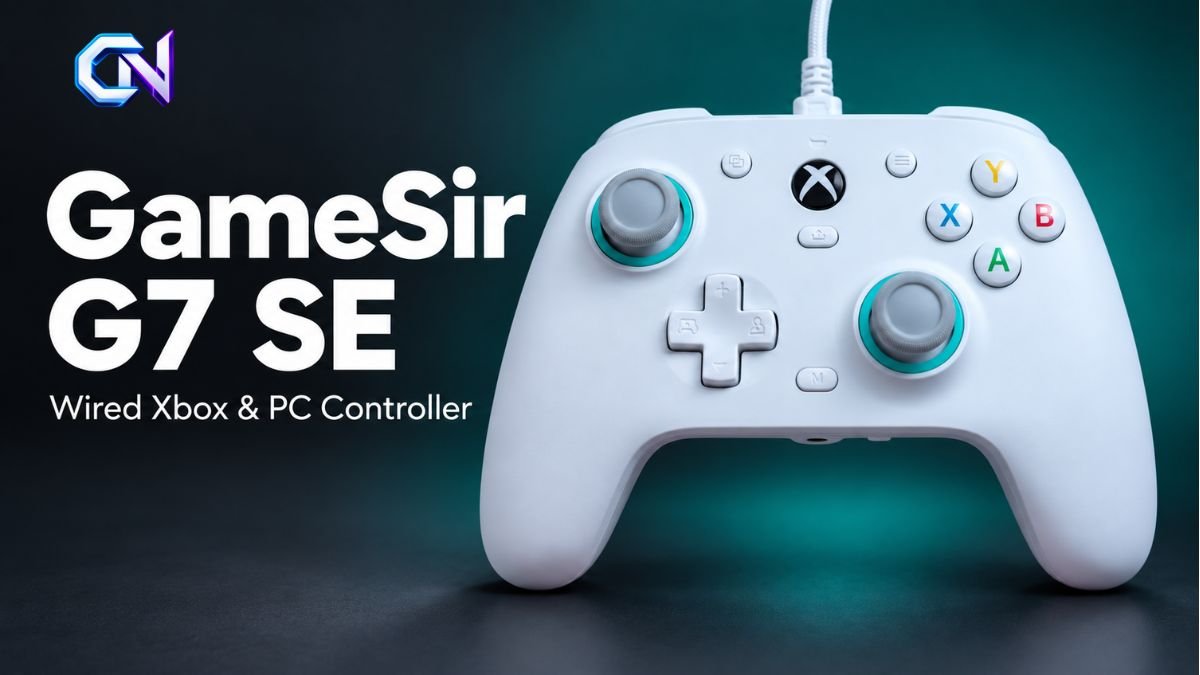
The GameSir G7 SE is an officially licensed wired controller for Xbox Series X|S, Xbox One and Windows 10/11 PCs. It combines Hall Effect sticks and triggers with two programmable rear buttons, a headset connection and customisable settings. Its main limitation is straightforward: it requires a USB connection throughout use.
GameSir’s US-dollar storefront lists the white model at $44.99 as of September 24, 2026. For buyers, the important questions extend beyond price: how the magnetic sticks behave, what the rear buttons can do, and which settings require additional PC configuration.
GameSir G7 SE specifications at a glance
| Feature | Official specification |
|---|---|
| Supported platforms | Xbox Series X|S, Xbox One, Windows 10/11 |
| Connection | Wired USB |
| Supplied cable | Detachable three-metre USB-C cable |
| Stick technology | Hall Effect magnetic sensors |
| Trigger technology | Hall Effect analog triggers |
| ABXY buttons | Membrane switches |
| Rear controls | Two mappable buttons with enable/disable latches |
| Audio | 3.5 mm headset jack |
| Vibration | Four motors: two in the grips and two behind the triggers |
| Configuration software | GameSir Nexus |
| Battery | None |
The platform list matters. GameSir does not include PlayStation, Nintendo Switch or macOS in this model’s stated compatibility. Buyers using another system should avoid assuming that a USB connection alone establishes support.
What Hall Effect sticks actually offer
The controller’s defining feature is its use of non-contact magnetic sensors in the analog sticks. These detect stick position magnetically, addressing wear at the sensing contact found in conventional designs.
GameSir markets the technology as protection against stick drift. However, its own support guidance makes an important distinction: unwanted movement can still appear when the initial dead zone is set to zero.
A dead zone is the area around a stick’s resting position where small movements are ignored. Removing that area makes the controller sensitive to very slight input. GameSir acknowledges that apparent drift at a zero setting can occur and recommends increasing the initial dead-zone value to between three and five in Nexus.
The practical takeaway is that magnetic sensing does not eliminate the need to choose appropriate settings. A zero dead zone should not automatically be treated as the ideal configuration for every game or controller.
The magnetic, removable faceplate offers another form of customisation. GameSir describes it as suitable for painting, allowing owners to change the controller’s appearance.
Rear buttons, trigger settings and physical controls
The two rear buttons, labelled L4 and R4, can be assigned controller inputs. Each has a physical latch that enables or disables it. This provides a direct way to prevent unwanted rear-button presses.
Mapping can be completed on the controller:
- Hold M and the chosen rear button together for three seconds.
- Wait for the indicator to blink.
- Press the controller button you want assigned to that rear control.
The front ABXY buttons use membrane switches, a relevant detail for anyone specifically seeking mechanical face buttons.
Both triggers support analog input, allowing the registered value to vary with the pull. GameSir also documents a hair-trigger mode, activated by holding M with the relevant trigger until the controller vibrates. This changes the trigger’s response setting; the rear latches are separately designated as controls for enabling or disabling the back buttons.
Profiles and adjustments in GameSir Nexus
GameSir Nexus is available through the Microsoft Store for Xbox and PC. It supports the G7 SE alongside several other licensed GameSir controllers.
The software provides button mapping, stick and trigger adjustments, D-pad diagonal settings and vibration controls. It also handles firmware updates and allows three custom profiles to be saved.
These profiles mean different configurations can be retained without manually rebuilding the settings each time. GameSir documents the following shortcuts:
| Button combination | Selected configuration |
|---|---|
| M + Y | Default profile |
| M + B | Custom profile 1 |
| M + A | Custom profile 2 |
| M + X | Custom profile 3 |
For rear-button assignments, the most recent setting takes precedence. Changing an assignment manually can overwrite the software configuration, and a later software change can replace the manual assignment.
That detail is useful when a rear button unexpectedly performs a different action: check the active profile and the latest mapping before assuming the hardware has failed.
How the 1000Hz PC setting works
The GameSir G7 SE supports a documented 1,000 Hz report-rate configuration on PC. Report rate describes how frequently controller input is reported to the computer. It should not be read as a guaranteed measurement of total input delay or in-game performance.
GameSir’s current instructions specify these steps:
- Update the controller to firmware 6.40 or later.
- Select 1000Hz under the Profiles menu in GameSir Nexus.
- Close Nexus completely.
- Allow the controller to switch to the required XInput mode.
If the automatic switch does not occur, the guide instructs users to hold the Xbox and Share buttons for three seconds. It also identifies USB-port and cable issues as possible obstacles to completing the change.
This procedure is explicitly a PC guide. Xbox buyers should not assume the same setting applies automatically to console use.
There is also an audio consideration. When troubleshooting headset problems, GameSir recommends returning the report rate to 250 Hz if it has been changed. Anyone using the controller’s audio jack should check headset operation after adjusting this setting.
Headset controls and everyday setup
The 3.5 mm connection supports headset use, with volume controls accessible through the controller. Holding M and pressing up or down on the D-pad adjusts the overall headset volume.
The documented left and right combinations adjust the balance between game audio and voice chat. A dedicated microphone button toggles mute, with a red indicator showing when muting is active.
If audio is missing, GameSir’s troubleshooting begins with checking that the headset plug is fully inserted and that the microphone has not been muted.
For connection problems, the manufacturer recommends checking the USB cable, trying another USB port and reviewing firmware availability in Nexus. Stick or trigger problems have a separate calibration procedure in the model’s instructions.
Price and buying considerations
At the listed $44.99 price, the white controller includes a USB-C cable. GameSir also offers other colours and accessory bundles, so the selected configuration matters when comparing prices.
That dollar figure is not a verified UK sterling price. UK buyers should check the seller’s current GBP total, while buyers in either market should confirm the chosen bundle and availability. Prices and software features may change.
The GameSir G7 SE is worth considering when the requirements are specific: supported Xbox or Windows hardware, magnetic sticks, configurable rear buttons and a wired connection. Before ordering, measure the cable route from the console or PC to the playing position. The supplied three-metre lead remains a practical constraint regardless of the controller’s software options.



1 comment